Semantic Versioning (SemVer) Calculator
Check a version against Semantic Versioning 2.0.0, bump it, compare or sort versions, or test a version against an npm range such as ^1.2.3.
^1.2.3 accepts. Everything runs in the browser, so nothing you type is uploaded, the tool is free, and there is no sign-up.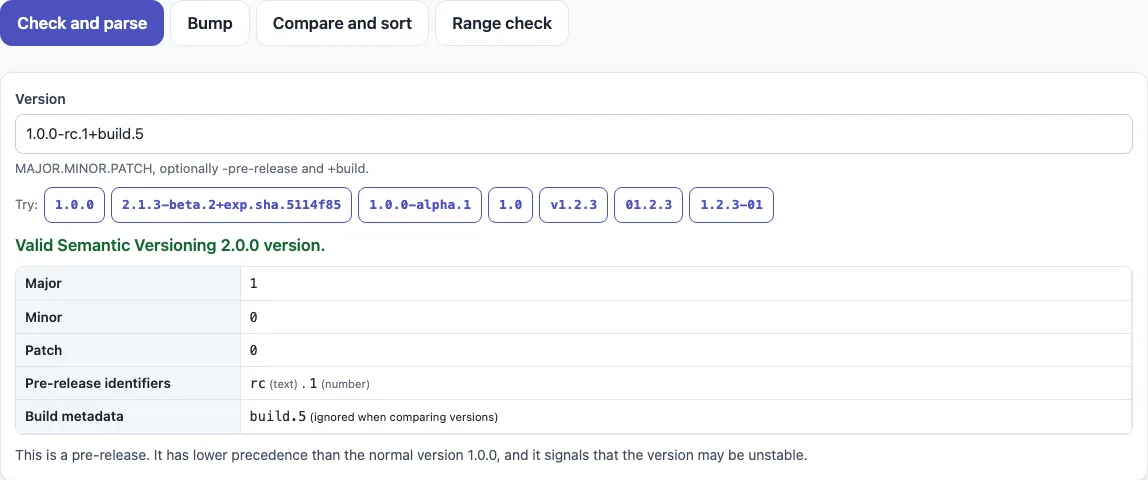
How to use the semantic versioning tool
- Open the tab you need. Click a tab, or press the left and right arrow keys to move between tabs.
- To check a version, open “Check and parse” and type it into “Version”. The default is
1.0.0-rc.1+build.5. A valid version shows Major, Minor, Patch, “Pre-release identifiers” and “Build metadata”. An invalid version lists every reason it fails. - If the version starts with “v” or contains spaces, press the button under “Did you mean” to get the cleaned version.
- To find the next version, open “Bump”. Set “Current version” (default
1.4.2), “Pre-release identifier” (defaultbeta) and “Pre-release counter starts at” (0, 1 or no counter). The table shows every next version at once. Press “Copy” beside the one you need. - To compare two versions, open “Compare and sort” and fill in “First version” and “Second version”. The result shows
<,>or=, plus the rule that decided it. - To sort a list, paste one version per line under “Versions, one per line”, or open or drop a file. Choose “Lowest first” or “Highest first”. Invalid lines are listed and skipped. Press “Copy” or “Download” (
sorted-versions.txt). - To test a range, open “Range check”, enter it in “Range”, and add the versions to test under “Versions to test, one per line”. Read the yes/no table and the “Matching versions” box. Tick “Include pre-releases in every match” to count pre-releases.
The page address keeps the tab and your inputs, so you can bookmark the result.
What is semantic versioning?
Semantic versioning is a numbering scheme with three numbers, MAJOR.MINOR.PATCH, such as 2.4.1. Each number signals the kind of change in a release, so people can judge an update from its number.
A patch change fixes bugs without breaking anything that already works. A minor change adds backward-compatible features, and it also applies when public API features are deprecated. A major change breaks backward compatibility. When a number goes up, the numbers to its right reset to 0, so 1.4.2 becomes 1.4.3 after a patch, 1.5.0 after a minor change and 2.0.0 after a major change.
Versions that start at 0.y.z are in initial development, so anything may change. Version 1.0.0 defines the public API. A pre-release adds a hyphen and dot-separated identifiers, as in 1.0.0-alpha.1. Build metadata adds a plus sign, as in 1.0.0+20130313144700.
How are versions compared, and which is higher, 1.9.0 or 1.10.0?
Version 1.10.0 is higher than 1.9.0. Versions are compared one number at a time, from left to right: major, then minor, then patch. Each number is read as a whole number, so 10 is greater than 9. Comparing the text “10” with “9” character by character would give the wrong answer.
If the major, minor and patch numbers are equal, a pre-release is lower than the normal version, so 1.0.0-rc.1 is lower than 1.0.0. Pre-release identifiers are compared from left to right. Numeric identifiers are compared as numbers, and identifiers with letters are compared in ASCII order. A numeric identifier is lower than a text one, and when all earlier identifiers are equal, the longer list is higher. The sample list in “Compare and sort” shows the full order:
1.0.0-alpha < 1.0.0-alpha.1 < 1.0.0-alpha.beta < 1.0.0-beta < 1.0.0-beta.2 < 1.0.0-beta.11 < 1.0.0-rc.1 < 1.0.0
Note that beta.11 is higher than beta.2, because 11 is greater than 2 as a number.
What do ^ and ~ mean in a version range?
They come from npm’s range syntax, which the “Range check” tab follows. A caret allows changes that do not modify the left-most non-zero number: ^1.2.3 means >=1.2.3 <2.0.0-0, while ^0.2.3 means >=0.2.3 <0.3.0-0. A tilde allows patch-level changes: ~1.2.3 means >=1.2.3 <1.3.0-0.
Sources (checked 13 October 2026): Semantic Versioning 2.0.0, node-semver ranges
Frequently asked questions
What does semver look like? Can you give examples?
Examples of semver are 1.0.0, 2.4.10 and 0.3.0. A pre-release such as 1.0.0-alpha.1 adds a hyphen, and build metadata such as 1.0.0+20130313144700 adds a plus sign. The “Check and parse” tab labels each part of any version you type.
Is “v1.2.3” valid semver?
No. A semantic version starts with the number, so v1.2.3 is not valid. The version is 1.2.3; the “v” is a common prefix on tags. “Check and parse” lists a leading “v” as a reason for failure and offers a “Did you mean” button that gives 1.2.3. The list in “Compare and sort” accepts a leading “v” and keeps it as typed.
Is build metadata used in comparison?
No. Build metadata, the part after the plus sign, is ignored when versions are compared, so 1.0.0+build.5 and 1.0.0+build.9 have the same precedence. “Bump” drops build metadata from its results.
What does ^1.2.3 mean?
The caret range ^1.2.3 means >=1.2.3 <2.0.0-0: it accepts 1.2.3 and any higher version below 2.0.0. For a version that starts with 0, the caret keeps the left-most non-zero number fixed, so ^0.2.3 means >=0.2.3 <0.3.0-0. Ranges follow the npm node-semver convention and are not part of the SemVer spec.
Why does ^1.2.3 not match 1.5.0-beta.1?
In npm ranges, a pre-release only matches if a comparator in the same set names a pre-release of the same major.minor.patch. The comparators in ^1.2.3 do not, so 1.5.0-beta.1 is left out. Tick “Include pre-releases in every match” to switch the rule off.
Can it automate versioning in a CI pipeline?
No. The tool does not connect to Azure DevOps, GitLab CI, Bitbucket Pipelines or CircleCI. Use it to work out the next version number and to check what a bump means. Pipelines that bump automatically usually read Conventional Commits; the release notes template shows which bump a list of commit subjects implies.
Does this tool upload the versions I type?
No. The tool runs in your browser and nothing you type or open is uploaded. It is free, with no sign-up.
Related tools
- Changelog template — when you want to record each version’s changes in a Keep a Changelog layout.
- Release notes template — when you want to write notes for a version you have numbered, or see the bump implied by commits.
- API documentation template — when you want to document the public API that a 1.0.0 release defines.
- OpenAPI example specs — when your API description needs its own version number.
- README generator — when you want a project README that shows the current version badge.
- GitHub README badge generator — when you want npm, PyPI or release version badges.
- Markdown formatter — when you want to tidy the Markdown in your changelog or release notes.