Release Notes Template
Pick a preset, fill in what changed, and get release notes as Markdown or plain text — or paste Conventional Commits subjects to sort them into sections.
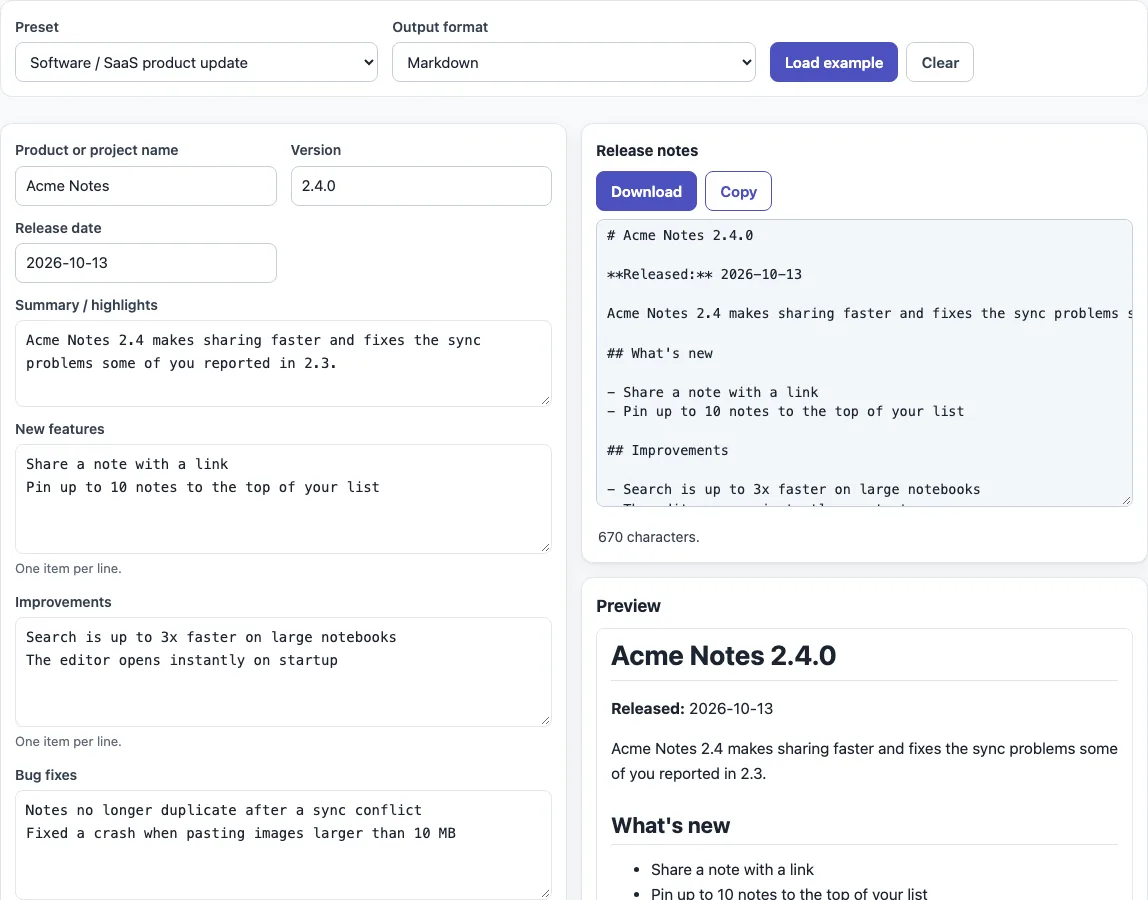
How to use the release notes template
- Choose a “Preset”: “Software / SaaS product update”, “Internal deployment notes”, “Mobile app store “What’s new”” or “Library / open-source release”.
- Press “Load example” to fill the fields with a realistic example for that preset. To start from scratch, press “Clear”, which empties all fields. Switching presets loads that preset’s example unless you have already edited something.
- Replace the example with your own details in the fields shown for the preset, such as “Product or project name”, “Version” and “Release date”. Empty fields are left out of the output.
- For list fields, put one item per line. Lines may start with
-,*,•or1., because those markers are stripped. - Optional: under “Import from commits”, paste one Conventional Commits subject per line and press “Sort commits into sections”. This fills “New features”, “Bug fixes”, “Improvements” and “Breaking changes”, replacing what was in them, and offers a button such as “Use 2.4.1” with the version that the implied bump gives, counted from the “Version” field.
- Set “Output format” to “Markdown” or “Plain text”. The mobile preset always uses plain text.
- Check the preview. For mobile text, watch the counters for the App Store and Google Play. Then press “Download” or “Copy”.
The file is named release-notes.md or release-notes.txt, and whats-new.txt for the mobile preset. The preset and format are also kept in the page address, so you can share a link to your setup.
What are release notes?
Release notes are a short summary of what changed in one release, written for the people who use the software or deploy it. There is no official universal format, so the presets follow common practice rather than a standard.
What goes in release notes?
Start with a summary or highlights, then list new features, improvements and bug fixes. Add known issues, breaking changes with upgrade steps, and deprecations when they apply, and credit contributors at the end. Write each entry for the reader, not the code, and leave out empty sections.
What are deployment release notes?
Deployment release notes are an internal record of one rollout. The “Internal deployment notes” preset starts with a title such as # Billing API 3.8.2 and a table with the environment, version, build or commit, date and tickets. It ends with a rollback plan and a sign-off checklist.
How long can app store release notes be?
Apple’s “What’s New in This Version” text is limited to 4,000 characters. It is not available for a first version and is required for later ones. Google Play release notes can use up to 500 Unicode characters per language. The mobile preset counts Unicode code points, and a line break counts as one. Its example text is 241 characters, so it fits both limits.
What is the difference between release notes and a changelog?
Release notes summarize one release for its users. A changelog is the full history across all releases. Keep a changelog as the running record and write release notes for each launch.
Can I generate release notes from commits?
Yes, if your commit subjects follow Conventional Commits, in the form <type>[optional scope]: <description>. The tool sorts feat into New features, fix into Bug fixes, and perf and refactor into Improvements. A type!: subject or a BREAKING CHANGE: line goes into Breaking changes. Housekeeping types such as docs and chore are left out; the FAQ below has the details.
The suggested bump is major for breaking changes, minor for feat, and patch for fix, perf and refactor. The Conventional Commits spec itself ties only fix, feat and breaking changes to Semantic Versioning, so treat the bump for perf and refactor as a suggestion to review.
Sources (checked 13 October 2026): Conventional Commits 1.0.0, Semantic Versioning 2.0.0, App Store Connect Help: Platform version information, Google Play Console Help: create and set up your app
Frequently asked questions
Is there an official release notes template?
No. Release notes do not have an official universal format. The presets follow common practice, so you can adjust the output to match your team’s style.
Can I use the output for commercial work?
Yes. What the tool produces can be used for any purpose, including commercial and client work, royalty-free and with no attribution. The only limit is that you may not copy the website or the tool itself as a competing service.
Is my text uploaded anywhere?
No. The tool runs in your browser, and nothing you type or open is uploaded. There is no sign-up, and it is free.
Can I use this for the App Store and Google Play?
Yes. Choose the mobile preset, which gives plain text with • bullets, and check the two live counters: 4,000 characters for Apple’s “What’s New in This Version” and 500 characters per language for Google Play.
Why are some commit lines missing from my output?
Lines that do not follow the Conventional Commits format are listed and ignored. Commits of type docs, style, test, build, ci, chore and revert are counted and left out, unless you tick “Also list docs, chore, build, ci, test, style and revert commits as Improvements”.
Does it work for Jira, Confluence or Word release notes?
The tool does not connect to Jira or Confluence and does not create Word files. It writes Markdown or plain text, which you copy and paste wherever your team keeps its release notes.
Related tools
- Changelog template — when you want the full history of changes across all releases, not one release summary.
- Semantic versioning calculator — when you need to work out the next version number from your changes.
- README generator — when you want a README that describes your project and how to install it.
- README examples and templates — when you want a README layout to fill in alongside your release notes.
- API documentation template — when you need to document the endpoints that a release adds or changes.
- Markdown editor — when you want to write or edit Markdown before you paste it into a release page.
- Markdown formatter — when you want to clean up the spacing and structure of Markdown you already have.