OpenAPI Example Specs (YAML and JSON)
Pick a complete OpenAPI document and copy it as YAML or JSON, or paste your own spec to check it and turn it into Markdown docs.
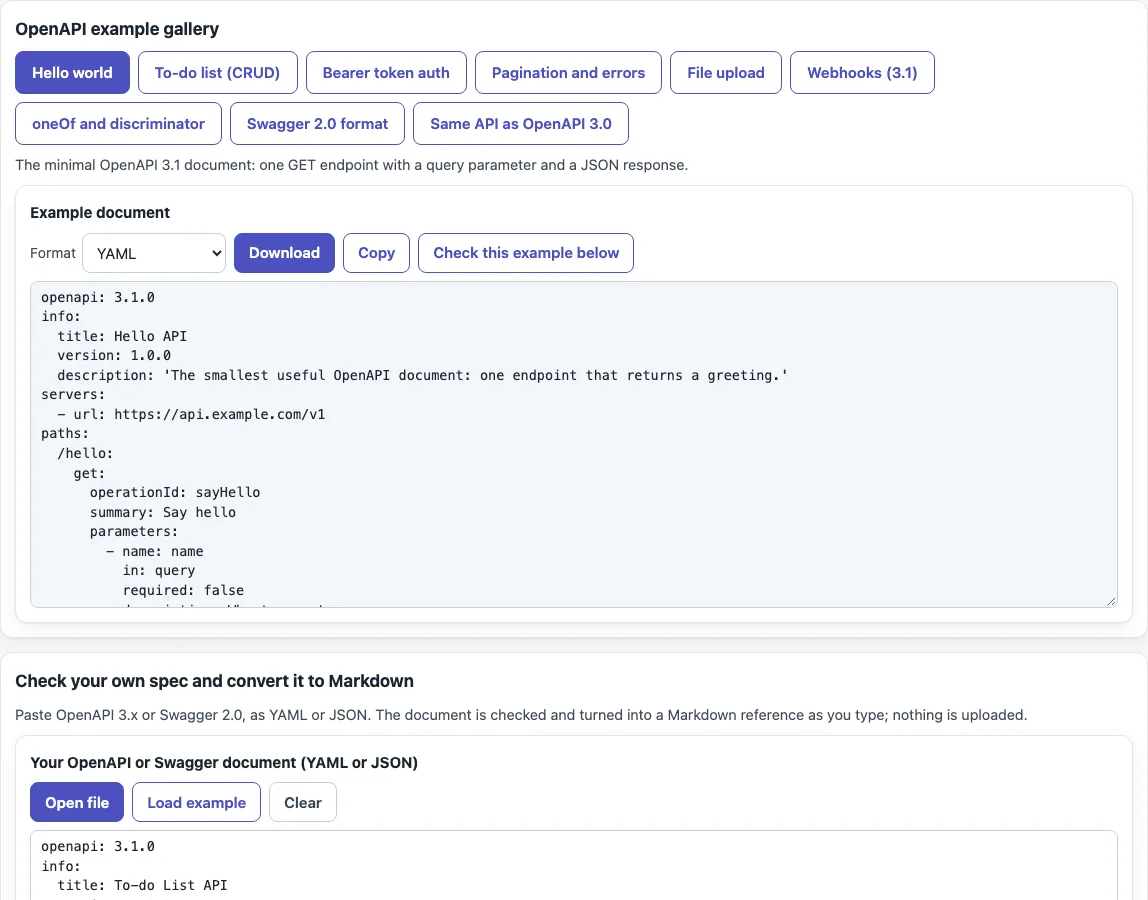
This OpenAPI example tool gives you working OpenAPI documents to read, copy and check. Choose from nine original, fictional examples in the “OpenAPI example gallery”, from “Hello world” to “Webhooks (3.1)”, and view each one as YAML or JSON. If you searched for a swagger api example or a swagger docs example, the gallery also has a “Swagger 2.0 format” version of a pet shelter API next to its OpenAPI 3.0 equivalent.
You can load any example into the checker below it, or paste your own spec. The checker lists errors and warnings with the path of each problem, and turns the spec into a Markdown reference. The tool runs in the browser, so nothing you type or open is uploaded. It is free, and no sign-up is needed.
How to use the OpenAPI example tool
- In the “OpenAPI example gallery”, press one of the example buttons, such as “Hello world” or “To-do list (CRUD)”.
- Use “Format” to choose YAML (the default) or JSON.
- Press “Copy” to copy the document, or “Download” to save it as
<id>.yamlor<id>.json, for exampletodo.yaml. - Press “Check this example below” to load the same document into the checker.
- Under “Check your own spec and convert it to Markdown”, paste your own spec or open a
.yaml,.ymlor.jsonfile. The editor starts with the To-do example, so replace it with your own content. - Read the live structural check. Each error and warning shows the path of the problem. Fix the errors first, then the warnings.
- The “Markdown reference” appears below as a “Preview” tab and a “Markdown” tab. On “Preview”, press “Download .md” or “Copy Markdown”. On “Markdown”, press “Download” or “Copy”. The file is named
api-reference.md.
You can paste either OpenAPI 3.x or Swagger 2.0, as YAML or JSON. Anything you produce with this tool, including the Markdown reference, may be used for any purpose, including commercial and client work, royalty-free and without attribution; the only limit is not to copy the website or tool itself as a competing service.
What does a minimal OpenAPI example look like?
A minimal OpenAPI 3.1 document needs openapi and info at the top level, plus at least one of paths, components or webhooks. In 3.0, paths is required. The “Hello world” example sets openapi to 3.1.0, gives info a title and version, and defines one GET /hello operation with a query parameter named name and a JSON response.
What is the difference between OpenAPI and Swagger?
Swagger 2.0 is the former name of the OpenAPI Specification 2.0. From version 3.0 onward the file uses the openapi field instead of swagger. Swagger UI is a separate tool that renders OpenAPI documents. The gallery’s pet shelter pair shows the changes: host, basePath and schemes become servers, a body parameter becomes requestBody, definitions become components.schemas, and securityDefinitions become components.securitySchemes.
How do I add authentication in OpenAPI?
Define the scheme under components.securitySchemes, for example BearerAuth with type: http, scheme: bearer and bearerFormat: JWT. Then add a top-level security entry so every operation requires it. To make one operation public, such as a login endpoint, set security: [] on it. Each scheme type needs its own fields: apiKey needs name and in, http needs scheme, oauth2 needs flows, and openIdConnect needs openIdConnectUrl. The mutualTLS type exists in 3.1 only.
How do I describe a file upload, webhooks, pagination or oneOf?
For a file upload, use a multipart/form-data request body with a file field and a text field, and set the file’s media type with encoding.file.contentType. In 3.1, format: binary is not used for this. For a raw binary download, use application/octet-stream with an empty schema, {}.
Webhooks go in a top-level webhooks object in 3.1, next to paths. The pagination example uses cursor and limit query parameters, with limit set to a minimum of 1, a maximum of 100 and a default of 20, and a next_cursor typed ["string","null"]. For oneOf, define Pet as oneOf Cat and Dog, then add a discriminator with propertyName: petType and an optional mapping. A discriminator is only used with oneOf, anyOf or allOf.
YAML or JSON?
Both are valid, since an OpenAPI document can be written in either. Choose YAML if people edit the file by hand, because it is shorter and easier to read. Choose JSON if tools generate or parse it. The recommended file names are openapi.yaml and openapi.json.
Sources (checked 13 October 2026): OpenAPI Specification 3.1.0, OpenAPI Specification 3.0.3
Frequently asked questions
How do I convert OpenAPI to Markdown?
Paste your spec into the checker, or open the file, and fix any errors it lists. Then use the “Markdown reference” buttons to copy the text or download api-reference.md. The reference covers the title, version, description, Servers, Authentication, Endpoints, Webhooks and Schemas.
Is my OpenAPI file uploaded anywhere?
No. Everything runs in the browser, and nothing you type or open is uploaded.
Can I use the output commercially?
Yes. What the tool produces may be used for any purpose, including commercial and client work, royalty-free, with no attribution needed. The only limit is not to copy the website or tool itself as a competing service.
Does the checker confirm that my schemas are valid?
Not fully. The checker is structural. It does not check full JSON Schema validity of schema objects, example values against their schemas, or external files. It shows a warning when an external $ref is present but does not follow it.
What does the checker look for?
Required fields such as info.title and info.version, path keys that start with /, path parameters declared for every {template}, unique operationId values, at least one response per operation, internal $ref links that resolve, and security requirements that point to defined schemes.
Can I try requests against my API here?
No. The tool reads and checks the document only; it does not send requests.
Related tools
- API documentation template — when you want to write the prose around your endpoints and export an OpenAPI skeleton.
- README generator — when you want a README that links to your API reference.
- Markdown table generator — when you want to build or edit tables, such as parameter lists, by hand.
- Markdown editor — when you want to edit the Markdown reference before you publish it.
- Semantic versioning calculator — when you need a version number for
info.version. - Changelog template — when you want to record what changed between versions of your API.
- Markdown formatter — when you want to tidy the exported reference before you commit it.