Mermaid Sequence Diagram Maker
List the participants and messages in a form, or edit the Mermaid code, and get a sequence diagram you can export as SVG or PNG.
How to use the Mermaid sequence diagram maker
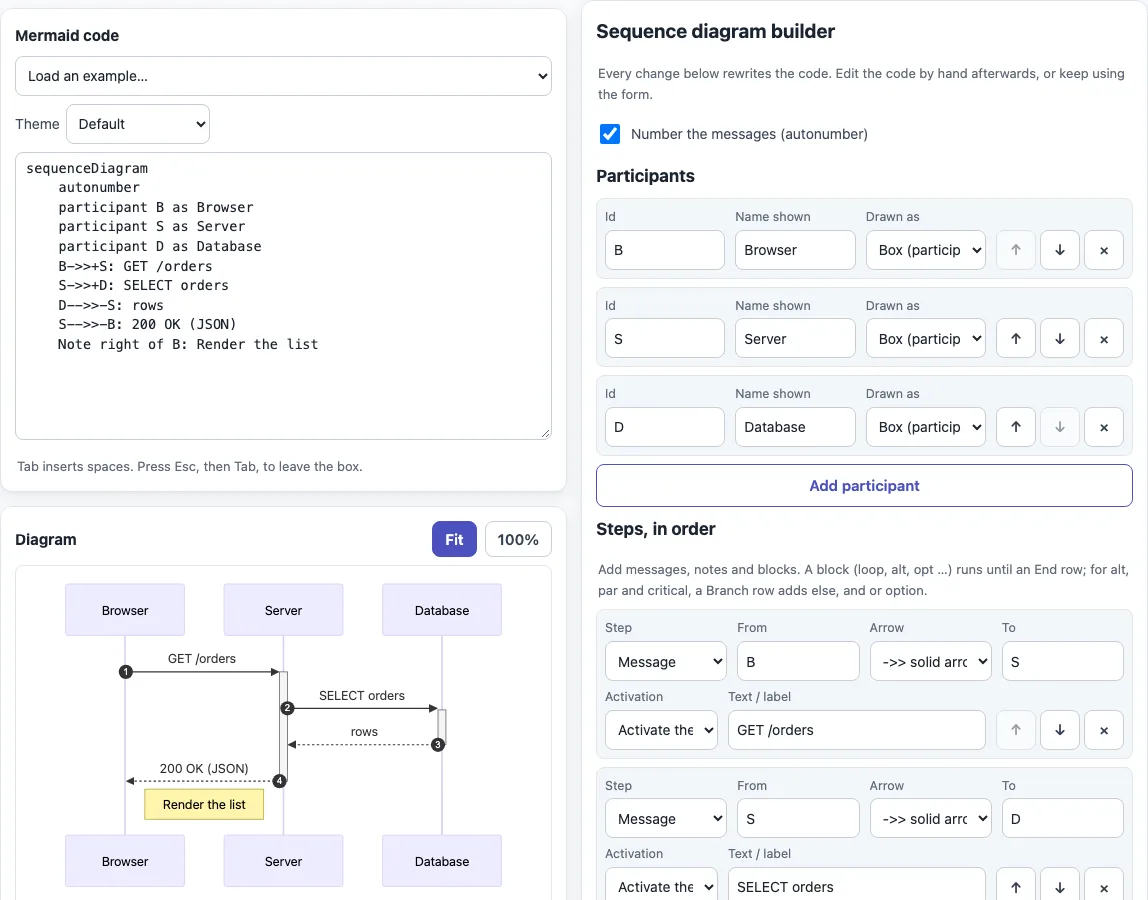
- The page opens with a sample: Browser, Server and Database participants, activation bars and a note. For another starting point, pick “Sequence diagram” or “Sequence with loop, alt and opt” in “Load an example…”.
- Tick or untick “Number the messages (autonumber)” to turn message numbers on or off. It starts ticked.
- In the “Participants” table, enter an “Id” and a “Name shown”, then choose under “Drawn as” either “Box (participant)” or “Person (actor)”.
- In the “Steps, in order” table, click “Add step” and set “Step” to Message, Note, Block start, Branch, End of block, Activate or Deactivate. The up, down and cross buttons on each row reorder or delete it.
- For a Message, set “From”, “Arrow”, “To”, “Activation” and “Text / label”. For a Note, set “Position” (Right of, Left of or Over), “Participant”, a second participant if the position is Over, and the text.
- For a block, choose loop, alt, opt, par, critical, break or rect, add steps, and close it with an “End of block” row.
- Read the code, then use “Download SVG”, “Download PNG”, “Copy code”, “Copy as Markdown” or “Copy link”. To print, use your browser’s print command; only the diagram is printed.
How do I write a sequence diagram in Mermaid?
A Mermaid sequence diagram is plain text that starts with sequenceDiagram. Each later line declares a participant, sends a message, adds a note or opens a block, and Mermaid draws them in order from top to bottom.
Declaring participants is optional; Mermaid creates one the first time it appears in a message. To give a participant a short id and a display name, write participant B as Browser. A message looks like B->>S: GET /orders, and a note like Note right of B: Render. Put + after an arrow to activate the receiver and - to deactivate it.
sequenceDiagram
    autonumber
    participant B as Browser
    participant S as Server
    B->>+S: GET /orders
    S-->>-B: 200 OK
    Note right of B: Render
Blocks end with end: loop, opt, break and rect, plus alt ... else, par ... and and critical ... option. A line that starts with %% is a comment. Mermaid reads a semicolon as the end of a line, so write #59; for a semicolon inside message text.
A note can also span two participants, as in Note over B,S: Secure channel. A rect rgb(235, 245, 255) block shades a group of messages with a background color, which helps when a long diagram has distinct phases. The builder’s “Block start” row offers rect with a color as its label.
When is a sequence diagram the right choice?
Use one when the order of messages matters more than the structure of the parts: an API call that passes through several services, a login handshake, or a checkout that waits on a payment provider. If you need to show decisions and branching paths instead of conversations, a flowchart fits better, and the flowchart maker on this site covers it.
What do the Mermaid sequence diagram arrows mean?
The arrow sets the line style and the end of a message. -> is a solid line and --> a dotted line, both without a head. ->> is a solid line with an arrowhead, and -->> a dotted one, often used for replies. -x and --x end in a cross, which suggests a lost or failed message. -) and --) end in an open arrow for asynchronous messages. <<->> and <<-->> put arrowheads at both ends and work from Mermaid 11.0.0. Half-arrows added in 11.12.3 are not available here, because the site uses Mermaid 11.6.
The “Message arrow types” table on this page draws all 10 arrows with their syntax and meaning.
Sources (checked 13 October 2026): Mermaid sequence diagram syntax, Mermaid syntax reference.
Frequently asked questions
How do I show activation bars?
Set “Activation” on a message to “Activate the receiver (+)” for the request and “Deactivate the sender (-)” for the reply. The code then reads B->>+S: GET /orders and S-->>-B: 200 OK. You can also add separate Activate and Deactivate rows.
How do I add a loop or if/else?
Add a “Block start” row and choose loop, alt or opt, then type its label. For if/else, choose alt, add a “Branch” row to get else, and close the block with an “End of block” row. The steps in between are indented in the code.
How do I use a semicolon in a message?
Type it in “Text / label” and the tool writes #59;. If you edit the code by hand, write #59; yourself. A hash sign becomes #35;, and line breaks become <br/>.
Can I use the diagrams I make for commercial work?
Yes. Diagrams and code made here may be used for any purpose, including commercial and client work, royalty-free and without attribution. The only limit is that you may not copy this website or tool as a competing service.
Can I add a note beside a participant?
Yes. Add a “Note” step, choose “Right of”, “Left of” or “Over” under “Position”, pick the participant, and type the text. With “Over” you can name a second participant to stretch the note across both lifelines.
Does my diagram get uploaded anywhere?
No. Everything runs in your browser, and the only file loaded is Mermaid 11.6 from this site.
Related tools
- Mermaid diagram editor — write any Mermaid diagram type directly in code.
- Mermaid flowchart maker — draw step-by-step process and decision diagrams.
- Mermaid class diagram maker — model classes, their attributes and relationships.
- Mermaid in Markdown previewer — see Mermaid diagrams rendered inside Markdown text.
- Mermaid cheat sheet — look up Mermaid keywords and arrows with live examples.
- Markdown editor — write the document that will hold your diagram.