Mermaid Flowchart Maker
Build a flowchart from a simple form (nodes, arrows, groups) or edit the Mermaid code directly; the diagram updates live and exports to SVG or PNG.
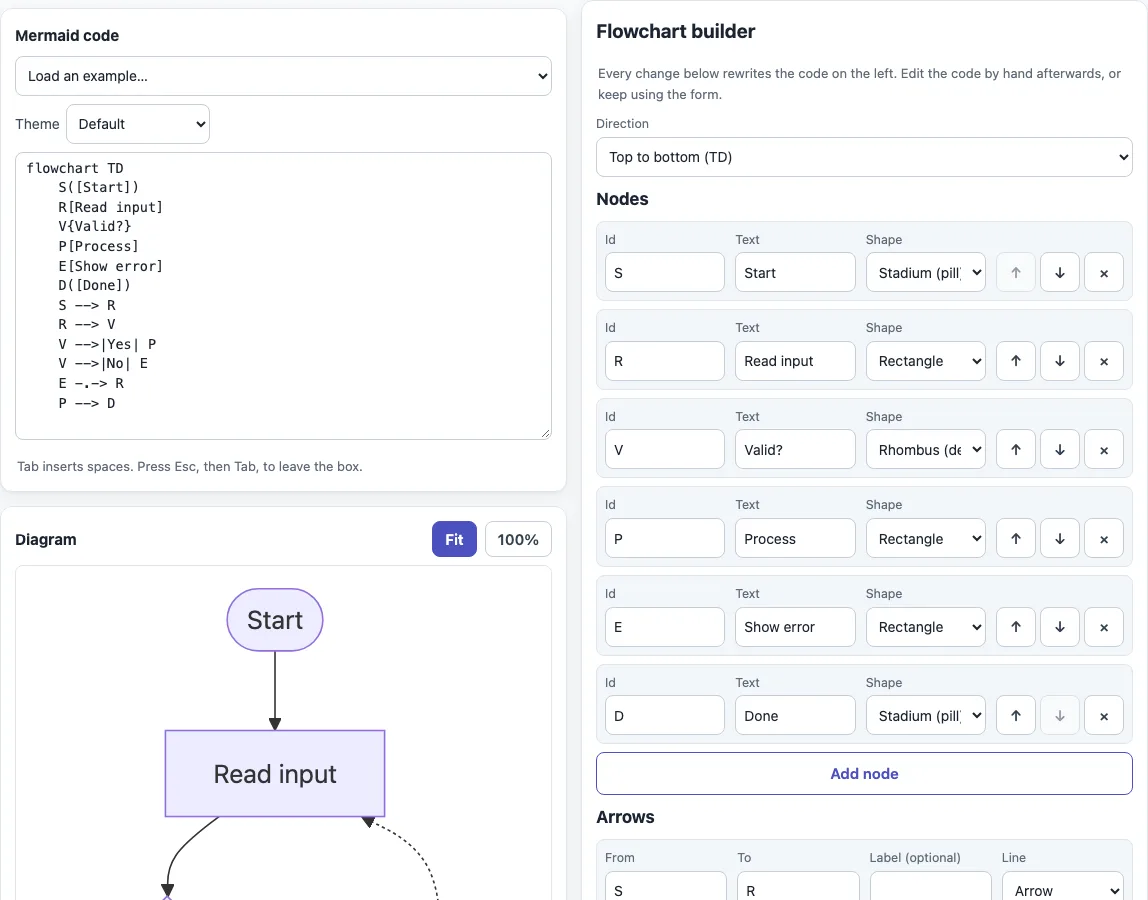
How to use the Mermaid flowchart maker
- The editor opens with a six-step example: Start, Read input, Valid?, Process, Show error and Done. The “Flowchart builder” form beside it describes the same diagram.
- Under “Direction”, choose “Top to bottom (TD)”, “Left to right (LR)”, “Bottom to top (BT)” or “Right to left (RL)”.
- In the “Nodes” table, fill in “Id”, “Text” and “Shape” for each row. Use “Add node” for more rows, and the up, down and cross buttons on each row (tooltips “Move up”, “Move down”, “Remove”) to reorder or delete them. Rows with an empty id are skipped.
- In the “Arrows” table, set “From” and “To” with node ids. Add an optional “Label (optional)” for text on the arrow, and pick a “Line” such as “Arrow”, “Dotted arrow”, “Thick arrow” or “Invisible link”.
- To group nodes, use “Add subgraph” in the “Subgraphs (groups)” table: give an “Id”, a “Title”, the “Node ids” separated by commas, and a “Direction inside”.
- Check the diagram and the code. Pick “Flowchart”, “Flowchart with subgraphs” or “Flowchart shapes” in “Load an example…” for a different starting point; this replaces the code but not the form.
- Use “Download SVG”, “Download PNG”, “Copy code”, “Copy as Markdown” or “Copy link” to take the result with you.
What is a Mermaid flowchart or Mermaid graph?
A Mermaid flowchart is a diagram written as plain text. You list nodes, which are the boxes and shapes, and arrows that show how they connect. The Mermaid JavaScript library reads the text and draws the chart.
The first line declares the type and direction, such as flowchart TD. A node is an id with optional text in brackets, such as P[Process], and a link joins two ids, such as S --> P. Wrap text with brackets or special characters in double quotes. The builder cleans ids to letters, digits and underscores, so spaces in an id become underscores.
flowchart TD
    S([Start]) --> V{Valid?}
    V -->|Yes| P[Process]
    V -.->|No| E[Show error]
How do I style a Mermaid flowchart?
Define a class with classDef and attach it with class. Use style for a single node, and linkStyle with a link’s number, counted from 0, for an arrow. A line that starts with %% is a comment and is ignored.
flowchart LR
    %% highlight the risky step
    A --> B --> C
    classDef hot fill:#fdd,stroke:#c00
    class B hot
    linkStyle 0 stroke:#c00,stroke-width:3px
Two traps are worth knowing. A node id that begins with o or x straight after an arrow, as in A---oB, is read as a circle or cross edge, so add a space or capitalize the id. And text with troublesome characters belongs in double quotes; entity codes such as #35; stand for a literal character.
Mermaid graph or flowchart: which keyword should I use?
Both work as the first line. A Mermaid graph written as graph TD is the older spelling of the same diagram, and flowchart TD is the newer keyword that this builder writes. Some other tools document only graph, so try that spelling if flowchart fails somewhere else.
For the direction, TB and TD both mean top to bottom, BT runs bottom to top, LR left to right and RL right to left. Inside a subgraph the builder writes TB instead of TD, because direction TD is a parse error there in Mermaid 11.6. Also, if any node in a subgraph links to a node outside it, Mermaid ignores the subgraph’s own direction and uses the parent’s.
Sources (checked 13 October 2026): Mermaid flowchart syntax, Mermaid syntax reference.
Frequently asked questions
How do I change the direction?
Pick another option under “Direction”. The code updates at once, and top to bottom is the default.
What node shapes can I use?
The “Shape” list offers 13 shapes: Rectangle, Rounded rectangle, Stadium (pill), Subroutine, Cylinder (database), Circle, Rhombus (decision), Hexagon, Parallelogram, Parallelogram, reversed, Trapezoid, Trapezoid, inverted and Double circle. The “Node shape syntax” table lower on the page draws each one.
How do I put text on an arrow?
Type it under “Label (optional)” in the “Arrows” table. The code puts it between pipes after the arrow, as in V -->|Yes| P. Writing V -- Yes --> P also works.
Why does my flowchart break on the word end?
A lowercase end closes a block, so it breaks the diagram when used as node text. Capitalize it as End, or put the text in double quotes. The builder quotes a lowercase end for you, so check only hand-edited code.
How do I group nodes?
Add a row to “Subgraphs (groups)” and list the node ids. Each node belongs to the first subgraph that lists it.
Can I use the output for commercial work?
Yes. Diagrams and code you make here may be used for any purpose, including commercial and client work, royalty-free and without attribution. The only limit is that you may not copy this website or tool as a competing service.
Related tools
- Mermaid diagram editor — write any Mermaid diagram type directly in code.
- Mermaid sequence diagram maker — show messages passing between participants over time.
- Mermaid class diagram maker — draw classes, their members and the links between them.
- Mermaid in Markdown previewer — check Mermaid blocks inside a Markdown document before you publish.
- Mermaid cheat sheet — look up syntax, shapes and styling with live examples.
- Markdown editor — write and preview the Markdown that will hold your diagram.
- Markdown cheat sheet — look up Markdown syntax for headings, lists, links and code.