Mermaid JS Diagram Editor
Type Mermaid code and see the diagram as you type; export it as SVG or PNG, copy it as a Markdown block, or share it as a link.
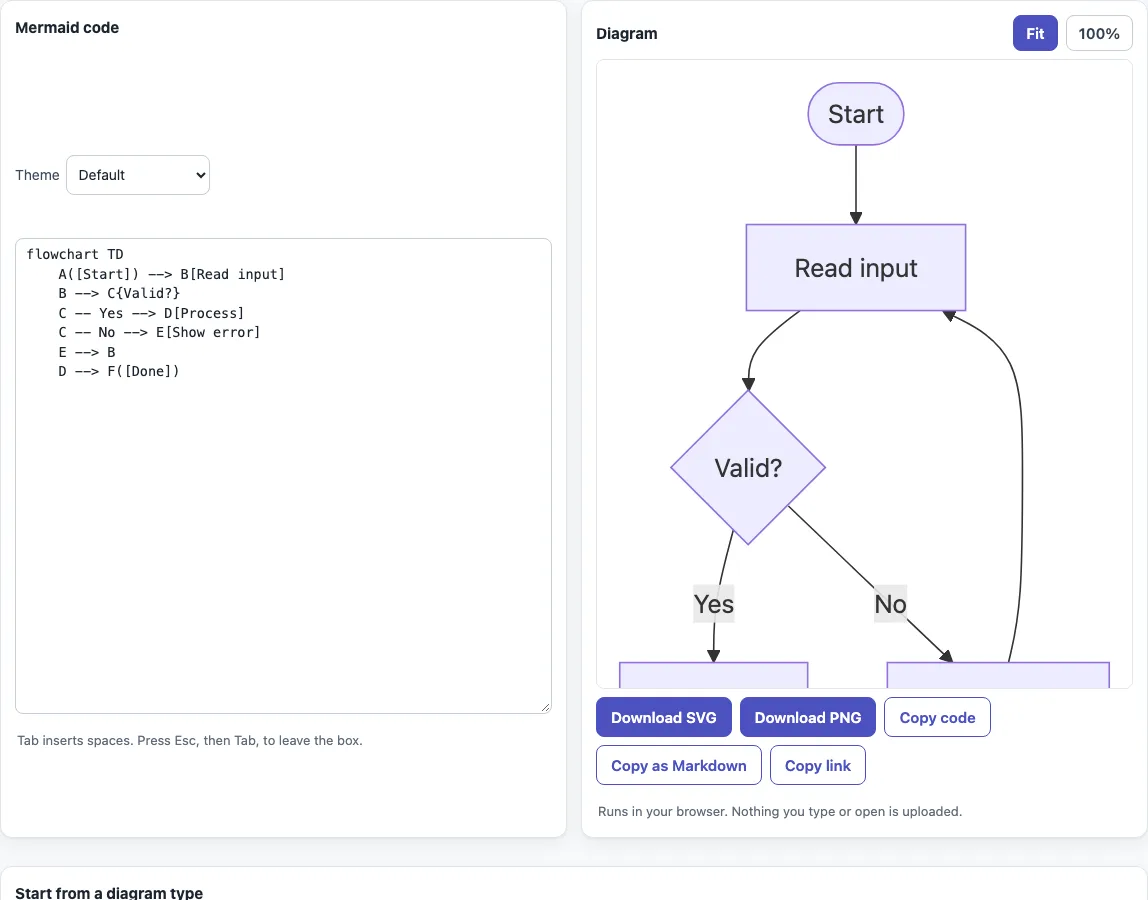
How to use the Mermaid editor
- Open the page. The “Flowchart” example is already loaded in the “Mermaid code” box and drawn in the “Diagram” box.
- To start from another diagram type, click one of the buttons below the editor, under “Start from a diagram type”. Each button replaces the code with an example.
- Edit the code. Tab inserts four spaces; to move focus out of the box, press Esc, then Tab.
- If the code has an error, Mermaid’s own message appears under the diagram. The last diagram that rendered stays visible but dimmed, with the note “The code has an error. This is the last diagram that rendered.”
- Choose a “Theme” above the code box: Default, Neutral, Dark or Forest. The diagram redraws at once.
- Above the diagram, pick “Fit” to scale it to the box width, or “100%” to see it at natural size with the box scrolling.
- Use the buttons under the diagram: “Download SVG”, “Download PNG”, “Copy code”, “Copy as Markdown” and “Copy link”.
To print, use your browser’s print command; only the diagram is printed, not the code. If you would rather fill in a form than type code, the flowchart, sequence diagram and class diagram pages on this site write the Mermaid code for you and open in the same editor.
What is a Mermaid diagram?
A Mermaid diagram is a chart written as plain text. You describe nodes, arrows and labels in short lines, and the Mermaid JavaScript library draws them as a flowchart, sequence diagram or another chart. Because the source is text, it is easy to edit, review and keep under version control.
Every diagram starts with a declaration line that names its type, such as flowchart TD or sequenceDiagram. The lines after it describe the content. A misspelled keyword breaks the diagram, while a misspelled parameter can fail without any message.
flowchart TD
    A([Start]) --> B[Read input]
    B --> C{Valid?}
    C -- Yes --> D[Process]
    C -- No --> E[Show error]
Is there a Mermaid JS online editor?
Yes, this page. It renders with Mermaid 11.6 in your browser and needs no account. The only file it loads is Mermaid itself, served from this site, so your diagram text stays on your device.
Can I use Mermaid diagrams in a README?
Yes. Click “Copy as Markdown” and paste the result into a Markdown file. Many platforms draw a mermaid fenced block as a diagram, but each one decides which Mermaid version it runs. To see a whole document with its diagrams, use the Mermaid in Markdown previewer linked below.
What diagram types does Mermaid support?
The examples here cover 14 types, each chosen by its declaration line: flowchart (or graph), sequenceDiagram, classDiagram, stateDiagram-v2, erDiagram, gantt, pie, mindmap, timeline, gitGraph, journey, quadrantChart, xychart-beta and block-beta. The 18 example buttons include variants such as flowcharts with subgraphs and sequence diagrams with loop, alt and opt blocks. Syntax added in later Mermaid releases may not render in version 11.6.
How do I make a Mermaid block diagram?
Start with block-beta, set the number of columns, list the blocks and connect them with arrows:
block-beta
  columns 3
  a["Input"] b["Process"] c["Output"]
  a --> b
  b --> c
Click “Block diagram” to load a working example, then change the labels and connections.
How do I save or share a diagram?
“Download SVG” saves diagram.svg, a standalone vector file without foreignObject elements, so vector editors can open it. “Download PNG” saves diagram.png at 2x resolution on a white background (dark for the Dark theme), limited to 8000 pixels on the long side.
“Copy link” copies a URL that holds your code after #code=, encoded as base64url. Anyone who opens it sees the diagram. If the encoded code is longer than 6000 characters, the page shows “Too long to put in a link”; use “Copy code” instead. Editing the code removes #code= from the address bar, so copy a fresh link after changes. “Copy as Markdown” wraps the code in a mermaid fence for a README or wiki page.
Sources (checked 13 October 2026): Mermaid flowchart syntax, Mermaid syntax reference, Mermaid sequence diagram syntax, Mermaid class diagram syntax.
Frequently asked questions
Is the Mermaid editor free to use?
Yes. It is free, and there is no sign-up.
Is my diagram code uploaded anywhere?
No. Everything runs in your browser, and nothing you type or open is uploaded. The only file loaded is Mermaid 11.6 from this site.
Why does my diagram show an error?
Mermaid’s message appears under the diagram. Check the declaration line, the spelling of keywords and the bracket pairs, since unknown words and misspellings break a diagram.
Why does my flowchart break when I use the word end?
A lowercase end closes a block in flowcharts and can break the diagram. Capitalize it as End, or put the text in double quotes.
Why does my code work here but not on another site?
Other sites may run a different Mermaid version than the 11.6 used here, and syntax added in later releases may not render in 11.6. Test the diagram where you will publish it.
Can I print a diagram?
Yes. Print from your browser; only the diagram is printed, without the code.
Does the editor work on a phone?
Yes. On narrow screens the code box and the diagram are stacked instead of side by side.
Can I use the diagrams commercially?
Yes. Diagrams you make here may be used for any purpose, including commercial and client work, royalty-free and without attribution. The only limit is that you may not copy this website or tool as a competing service.
Related tools
- Mermaid flowchart maker — build a process or decision diagram from a form.
- Mermaid sequence diagram maker — show messages passing between systems or people over time.
- Mermaid class diagram maker — model classes, their members and how they relate.
- Mermaid in Markdown previewer — check how Mermaid blocks look inside a Markdown document.
- Mermaid cheat sheet — look up syntax for any diagram type with live examples.
- Markdown editor — write the document that will hold your diagrams.
- Markdown cheat sheet — look up Markdown formatting.