Mermaid UML Class Diagram Maker
Add classes, attributes, methods and relationships in a form, or edit the Mermaid code, and get a UML class diagram to export as SVG or PNG.
classDiagram code and draws it live beside the form. Every form change rewrites the code, so you can learn the syntax as you work, or edit the code by hand afterwards. The example picker can load “Class diagram” or “Class relationships” as a starting point, and you can export the result as SVG or PNG. It runs in your browser, nothing you type is uploaded, it is free, and there is no sign-up.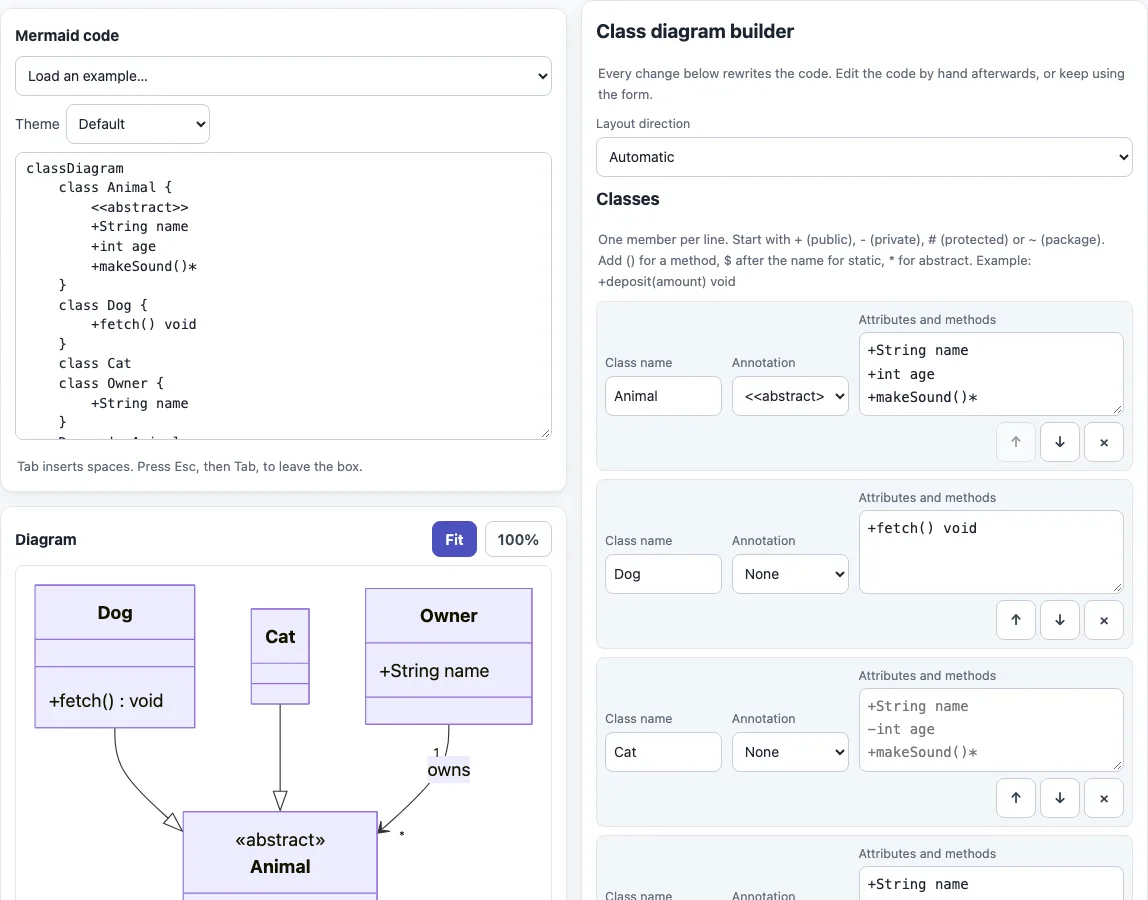
How to use the Mermaid class diagram maker
- The page opens with an example: an abstract Animal class, Dog, Cat and Owner. To start from another one, pick “Class diagram” or “Class relationships” in “Load an example…”.
- Under “Layout direction”, choose “Automatic”, “Top to bottom”, “Left to right”, “Bottom to top” or “Right to left”.
- In the “Classes” table, type a “Class name”. Click “Add class” for more rows.
- Choose an “Annotation”: None,
<<interface>>,<<abstract>>,<<enumeration>>or<<service>>. - In “Attributes and methods”, type one member per line, such as
+deposit(amount) void. Start each with a visibility sign:+,-,#or~. - In the “Relationships” table, click “Add relationship” and set “From”, “Relationship”, “To”, “Cardinality at From”, “Cardinality at To” and “Label”. Read each row as From, relationship, To: “Dog inherits Animal”.
- Check the diagram, then use “Download SVG”, “Download PNG”, “Copy code”, “Copy as Markdown” or “Copy link”.
Duplicate or empty class names are skipped, so check the list if a class seems to vanish. Class names are cleaned to letters, digits, underscores and tildes, so a generic name such as Box~T~ is kept. Editing the generated code by hand is fine, but the next form change rewrites it, so finish the form first. Printing from the browser prints only the diagram.
Can Mermaid draw UML?
For some diagram types, yes. classDiagram, sequenceDiagram and stateDiagram-v2 correspond to UML diagram names. The entity relationship diagram (erDiagram) is a database modeling notation, not a UML diagram type. The table on this page lists these four with links to the matching tools.
How do I write a class diagram in Mermaid?
Start with classDiagram. Write each class as class Name { ... } with its members inside the braces, and put relationships on their own lines. A line that starts with %% is a comment.
classDiagram
    class Animal {
        <<abstract>>
        +String name
        +makeSound()*
    }
    class Dog {
        +fetch() void
    }
    Dog --|> Animal
    Owner "1" --> "*" Dog : owns
What do the visibility signs, static and abstract mean?
| Sign | Meaning |
|---|---|
+ | public |
- | private |
# | protected |
~ | package or internal |
A member line reads as a visibility sign, an optional type and a name, for example -double balance for a field and +deposit(amount) void for a method; the parentheses are what make it a method. Add * at the end of a method for abstract, as in makeSound()*. Add $ at the end of a method or field for static, as in create()$ or String count$. Put <<interface>> as the first line inside a class to mark an interface.
What do the relationship arrows mean?
Dog --|> Animal: inheritance. Mermaid’s own docs spell itAnimal <|-- Dog; both render.Car *-- Engine: composition. Car owns Engine, which cannot exist without it.Team o-- Player: aggregation, a weaker “has a” link.A --> B: association.A -- Bis a plain solid link.A ..> B: dependency.A ..|> B: realization.A .. B: a dashed link.
Cardinality goes in quotes beside each end: Customer "1" --> "0..*" Order : places. Generic types sit between tildes, as in Box~T~.
Composition and aggregation both mean “has a”, and the difference is lifetime. In practice, choose composition when the part is destroyed with its owner, such as a room in a building plan, and aggregation when the part can outlive the group, such as a player in a team.
How do I style or lay out a class diagram?
A direction LR line sets the layout direction; the builder’s “Layout direction” list writes it for you. You can also add members one at a time with Dog : +fetch() void. For color, define a style with classDef and attach it with cssClass:
classDiagram
    direction LR
    class Dog
    class Cat
    Dog --> Cat
    classDef hot fill:#fdd,stroke:#c00
    cssClass "Dog" hot
Sources (checked 13 October 2026): Mermaid class diagram syntax, Mermaid syntax reference.
Frequently asked questions
Is my diagram uploaded anywhere?
No. Everything runs in your browser, and nothing you type or open is uploaded. The only file loaded is Mermaid 11.6 from this site.
Can I use the diagrams commercially?
Yes. Diagrams and code made here may be used for any purpose, including commercial and client work, royalty-free and without attribution. The only limit is that you may not copy this website or tool as a competing service.
Why is my class missing from the diagram?
Duplicate or empty class names are skipped. Check the “Classes” table for a repeated or blank name.
Why does a generic name look different in relationships?
The generic part, such as ~T~ in Box~T~, stays in the class name but is dropped from the name when the class appears in a relationship row.
How do I show cardinality?
Fill in “Cardinality at From” and “Cardinality at To”. Common values are 1, 0..1, 1..*, *, n, 0..n and 1..n.
How do I make an interface or an enumeration?
Choose <<interface>> or <<enumeration>> under “Annotation”. The code gets a nested annotation line as the first line inside the class body.
Can I change the layout direction?
Yes. Pick one of the options under “Layout direction”. “Automatic” writes no direction statement and leaves the choice to Mermaid.
Related tools
- Mermaid diagram editor — draw state diagrams, ER diagrams and other types beyond class diagrams.
- Mermaid flowchart maker — map a process or decision path.
- Mermaid sequence diagram maker — show messages passed between objects over time.
- Mermaid in Markdown previewer — check Mermaid diagrams inside Markdown text.
- Mermaid cheat sheet — look up class diagram syntax and other types with live examples.
- Markdown editor — write the document that will hold your diagram.