Mermaid Cheat Sheet – Diagram Syntax and Docs Quick Reference
A searchable list of Mermaid syntax for every diagram type, each with a live example you can copy or open in the editor.
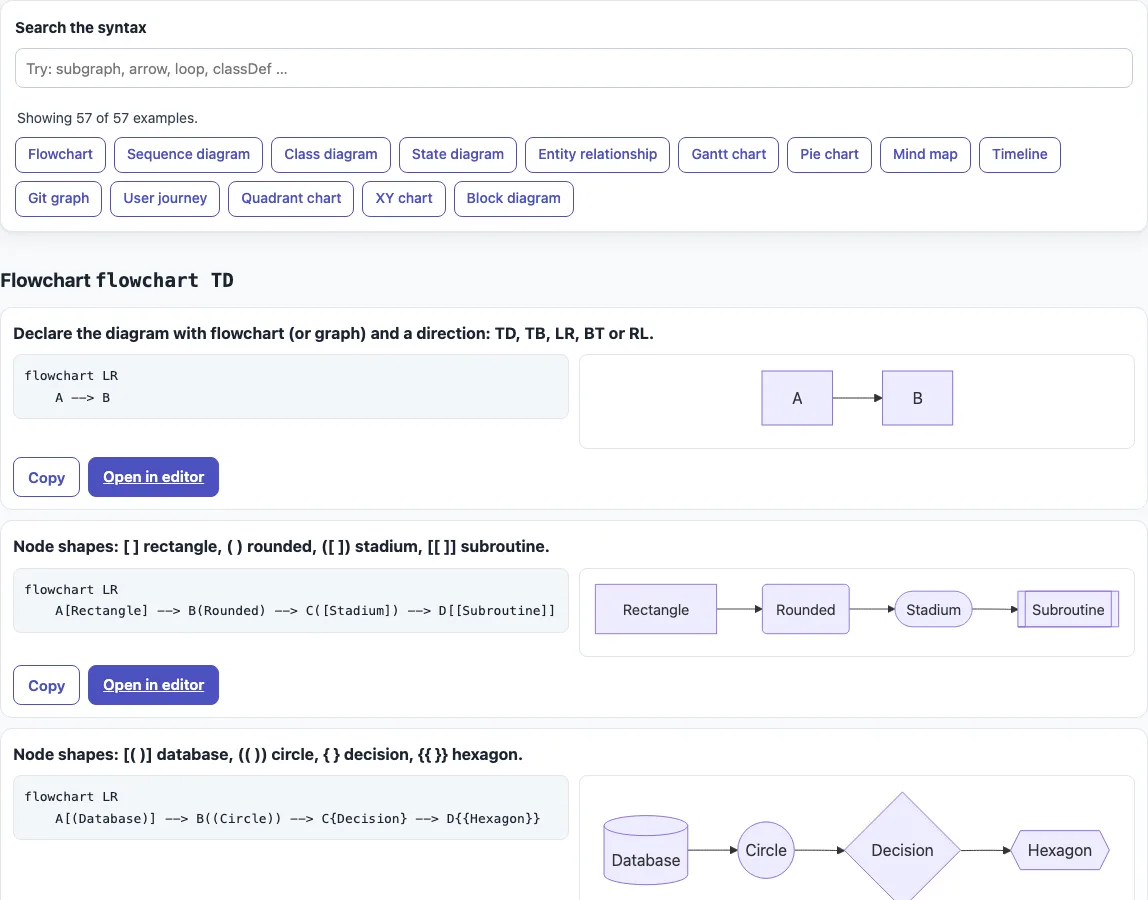
How to use the Mermaid cheat sheet
- Type a word into the “Search the syntax” box, such as
subgraph,arroworloop. The examples filter by words in the section name, the explanation and the code, and a line shows “Showing N of 57 examples.” - Or click one of the buttons under “Jump to a diagram type” to go straight to a section, such as Flowchart or Sequence diagram.
- Each section heading shows its declaration keyword, such as
flowchart TDorsequenceDiagram. Every diagram starts with a line like this. - On each card, read the one-sentence explanation, then the example code. The rendered diagram appears when the card scrolls into view.
- Click “Copy” to copy the code, or “Open in editor” to open the Mermaid editor with that example already loaded, ready to change.
Search for the symbol itself, such as --> or classDef, when you know the syntax but not its name. A search with several words shows only the cards that contain all of them. Clear the box to see every example again, and read the count line to check how many cards match.
For a printed reference, use your browser’s print command. The printout is text only: headings, explanations and code, without the rendered diagrams.
What is the Mermaid diagram syntax?
Mermaid diagram syntax is the set of keywords, symbols and layout rules you write as plain text. Every diagram starts with a declaration line that names its type, and the lines below it use that type’s own rules. The first line for each type covered here is:
| Diagram | First line |
|---|---|
| Flowchart | flowchart TD (or graph TD) |
| Sequence diagram | sequenceDiagram |
| Class diagram | classDiagram |
| State diagram | stateDiagram-v2 |
| Entity relationship | erDiagram |
| Gantt chart | gantt |
| Pie chart | pie |
| Mind map | mindmap |
| Timeline | timeline |
| Git graph | gitGraph |
| User journey | journey |
| Quadrant chart | quadrantChart |
| XY chart | xychart-beta |
| Block diagram | block-beta |
Some keywords are marked beta in Mermaid 11.6, such as xychart-beta and block-beta. Mermaid adds diagram types and options with new releases, and the examples here were checked against version 11.6, so a newer keyword you find in the official docs may not render in the editor on this site.
Inside a flowchart, the shape comes from the brackets around the text: A[Rectangle], A(Rounded), A([Stadium]), A[[Subroutine]], A[(Database)], A((Circle)) and A{Decision}. Links use --> for an arrow, --- for a line, -.-> for dotted and ==> for thick, and -->|text| puts text on a link. Class members begin with +, -, # or ~ for visibility, and end with $ for static or * for abstract.
A few rules cause most mistakes. Unknown words and misspelled keywords break a diagram, and misspelled parameters fail silently. Flowchart directions are TB, TD, BT, RL and LR. A lowercase end breaks a flowchart, so use another label or quote the text; use end only to close a subgraph. In sequence diagrams, a semicolon in message text must be written as #59;.
How do I comment in Mermaid?
Start a line with %%. Mermaid ignores that line, so comments work for notes about a flow. Keep curly braces out of comments, because they can be mistaken for a directive.
%% Payment steps, checked before release
flowchart TD
  A[Cart] --> B[Pay]
How do I style a diagram or set its theme?
In flowcharts, classDef defines a style and class applies it. Configuration goes in frontmatter between --- lines on the first lines of the code, or in a %%{init: ...}%% directive:
---
title: Checkout
config:
  theme: forest
---
flowchart LR
  A --> B
  classDef hot fill:#fdd,stroke:#c00
  class B hot
Sources (checked 13 October 2026): Mermaid syntax reference, Mermaid flowchart syntax, Mermaid sequence diagram syntax, Mermaid class diagram syntax.
Frequently asked questions
Where are Mermaid diagram examples?
Here: 57 live examples in one section per diagram type. Search or use the jump buttons to find a type, then click “Open in editor” on any card to try it. The editor also has 18 ready-made examples.
Where are the Mermaid docs?
At mermaid.js.org, the official documentation, which has one syntax page per diagram type, with names such as gantt.html, pie.html, timeline.html and mindmap.html. The examples here cover common syntax and do not replace the full reference.
How do I set the theme in the code?
Use a %%{init: ...}%% directive on the first line, such as %%{init: {"theme": "dark"} }%%, or set theme under config in frontmatter, as in the example above.
Does this page upload what I type?
No. Everything runs in your browser. The only file loaded is Mermaid 11.6 from this site.
Why does my flowchart break when I use the word end?
A lowercase end breaks flowcharts. Rename the node, for example to Finish, or put the text in quotes.
What arrows can a sequence diagram use?
-> and --> are lines without heads, ->> and -->> have arrowheads, -x and --x end in a cross, and -) and --) are open arrows for asynchronous messages. Bidirectional <<->> and <<-->> also work from Mermaid 11.0.0.
How do I add text to a flowchart arrow?
Write the text between pipes after the arrow, as in A -->|yes| B, or between dashes, as in A -- yes --> B.
Related tools
- Mermaid diagram editor — write and change your own diagram code with a live preview.
- Mermaid flowchart maker — build a flowchart from steps, decisions and arrows.
- Mermaid sequence diagram maker — show messages passed between people or services over time.
- Mermaid class diagram maker — draw classes, their members and how they relate.
- Mermaid in Markdown previewer — check Mermaid code that sits inside a Markdown document.
- Markdown cheat sheet — look up Markdown syntax for headings, lists and code fences.