Markdown Table Syntax Checker
Paste a Markdown table and see exactly what is wrong with it, line by line, by the GitHub Flavored Markdown spec. Get a fixed, aligned version and a live syntax reference.
|) between the cells. Paste your text into the box and the tool updates as you type. It lists each problem with its line number, marked Error or Warning, and builds a fixed, aligned version that you can copy or download as table.md. A reference with six live examples sits below the checker. The tool runs in your browser, is free and needs no sign-up, and nothing you type or open is uploaded.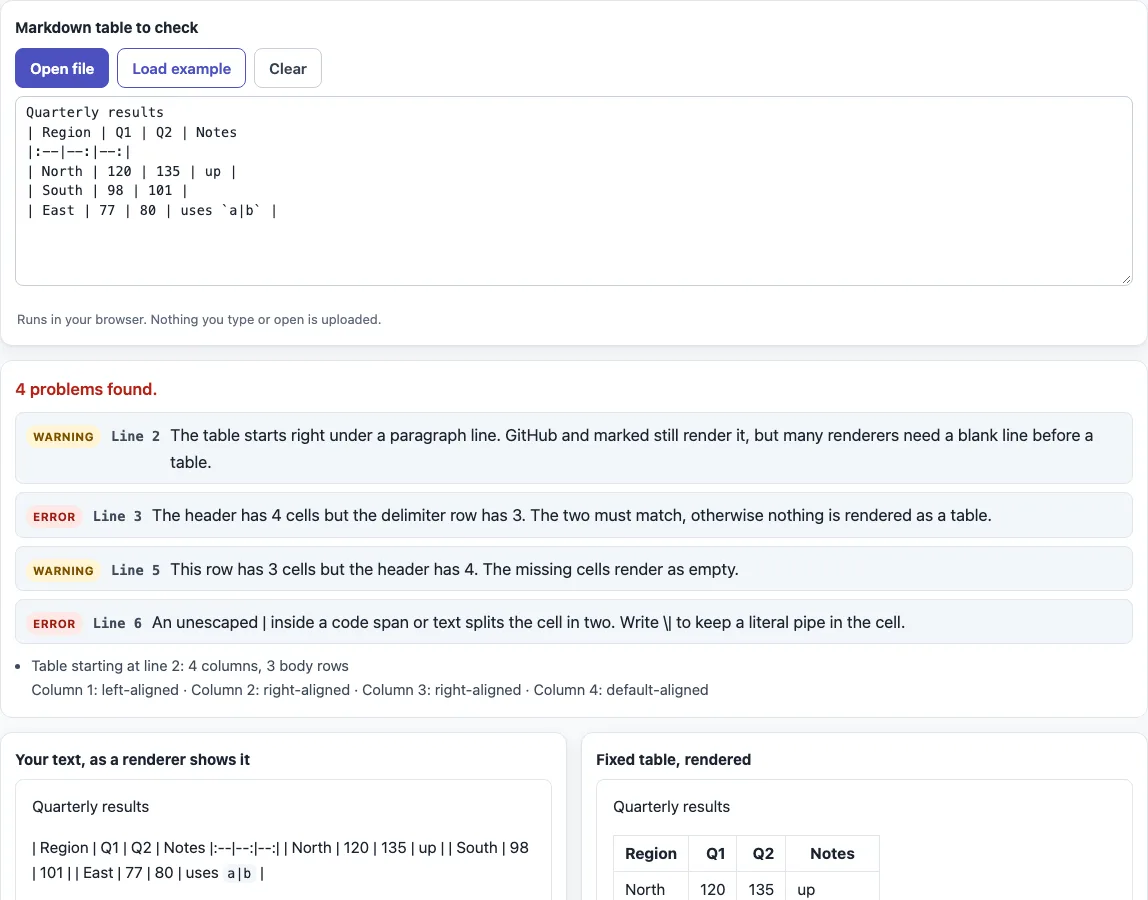
How to use the Markdown table checker
- Paste your Markdown into the “Markdown table to check” box. It opens with a deliberately broken example so you see output straight away. Replace it with your own text, click “Open file” to load a file, or use “Load example” to bring the sample back. “Clear” empties the box.
- Read the status line, for example “4 problems found.” or “No syntax problems found in 1 table.”
- Check the problem list. Each entry shows Error or Warning, a line number and a plain-language explanation.
- Read the table summary: for each table it gives the start line, the number of columns and body rows, and the alignment of every column (default, left, center or right).
- Compare the two previews, “Your text, as a renderer shows it” and “Fixed table, rendered”.
- Click “Copy” or “Download” under “Fixed and formatted” to take the corrected table. The download is named
table.md.
The output updates as you type, so you can fix a problem and see the result at once. The fixes include inserting or repairing the delimiter row, escaping pipes in code spans, padding short rows, and adding columns for extra cells so no data is dropped. A blank line is added before a table that sits right under a paragraph line. Text outside tables and fenced code is kept as written. Below the results, each example in “Markdown table syntax reference” has an editable source box with a live result.
What is the syntax of a Markdown table?
A Markdown table is written as lines of text, with each row split into cells by pipes (|). It needs a header row and a delimiter row directly under it; body rows are optional.
| Name | Score |
| :--- | ---: |
| Ana  | 9     |
The delimiter row uses only hyphens, with an optional colon at either end. :-- aligns a column left, --: aligns it right and :-: centers it. A delimiter cell without a colon uses the default alignment. The number of cells in the header must match the number of cells in the delimiter row. A body row with fewer cells gets empty cells, and extra cells in a longer row are ignored. The pipes at the start and end of each row are optional.
Why is my table not rendering?
The most common cause is a header and delimiter row with different cell counts. Then no table is recognized, and the lines appear as a paragraph. Other causes are a missing delimiter row, a blank line between the header and the delimiter row, and a header indented four or more spaces, which makes it a code block.
A blank line ends the table, so rows below the gap are not part of it. The table also ends at the start of another block-level structure, such as a heading or a list item. A line without pipes directly under the table is still read as a row. Many renderers need a blank line before a table, so adding one is a safe habit.
What can go inside a table cell?
Cells hold inline Markdown only: bold, italic, code, links, images and strikethrough. Block elements such as lists or headings do not work in a cell. A line break is written as <br>, because each row must stay on one line.
What does the checker do with the broken example?
The sample has a table glued to the line “Quarterly results”, a four-cell header above a three-cell delimiter row, a short row and an unescaped pipe in `a|b`. The checker reports a warning for the glued table, an error for the cell count, a warning for the short row and an error for the pipe. In the fixed version the delimiter row has four cells, the short row has an empty last cell, and the code span reads a\|b.
Sources (checked 13 October 2026): GitHub Flavored Markdown spec, Tables extension, CommonMark 0.31.2.
Frequently asked questions
How do I align columns in a Markdown table?
Add a colon to the delimiter row. Use :-- for left, --: for right and :-: for center. Columns with no colon use the default alignment.
How do I escape a pipe in a cell?
Write \| in place of the pipe, as in a\|b. This also applies inside code spans, where an unescaped pipe would split the cell.
How do I add a line break in a cell?
Write <br> inside the cell. It renders as a line break in the cell, and the “Line break inside a cell” example in the reference lets you test it.
How do I leave a cell empty?
Write nothing between the pipes, for example | |. A short row also gets empty cells at its end, so you do not need to fill them in.
What happens if a row has too many or too few cells?
A row with too few cells gets empty cells. A row with too many cells has the extra cells ignored, so data can be lost. The fixed output adds columns for the extra cells so that no data is dropped.
Are the outer pipes required?
No. You can leave out the pipes at the start and end of each row. The pipes between cells, including the ones in the delimiter row, are still required.
Is my table uploaded anywhere?
No. The checker runs in your browser, and nothing you type, paste or open is uploaded.
Related tools
- Markdown table generator — build a table from rows and columns when you do not want to type pipes by hand.
- Markdown formatter — tidy the rest of a Markdown document when the problem is more than one table.
- Markdown cheat sheet — look up the syntax for headings, lists, links and other elements next to your table.
- Markdown editor — write and preview Markdown in one place.
- Markdown to HTML converter — see the HTML that a Markdown table turns into.
- README generator — create a README file that includes tables for project information.