API Documentation Template
Fill in your API's authentication, errors and endpoints and get a Markdown reference with a table of contents and a curl example for every endpoint.
API.md) or an OpenAPI 3.1 YAML file (openapi.yaml). The form covers the API name and base URL, authentication, rate limits, error codes, versioning, and each endpoint with its parameters, request body and responses. Everything runs in your browser, the tool is free, there is no sign-up, and nothing you type is uploaded.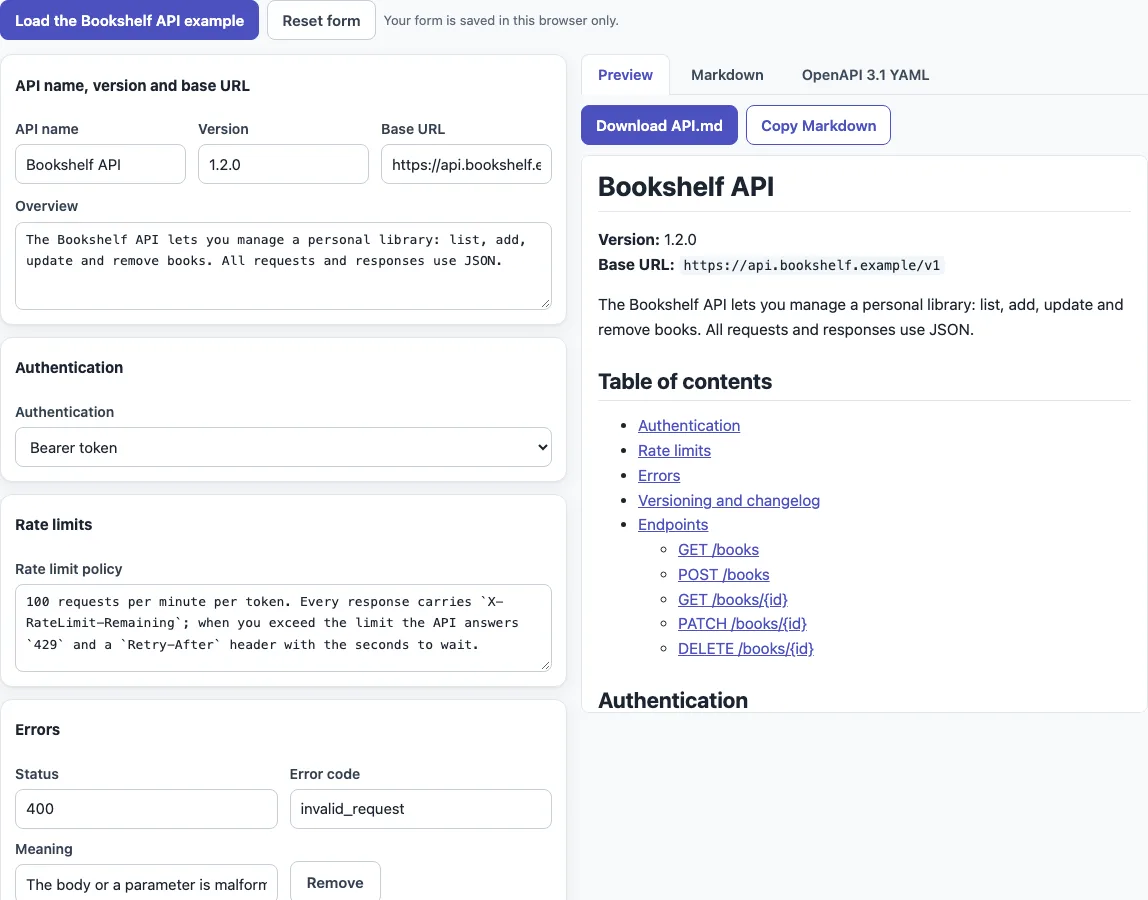
How to use the API documentation template
- Open the page. The Bookshelf API example is already loaded, and the preview shows straight away.
- Under “API name, version and base URL”, replace “API name”, “Version”, “Base URL” and “Overview” with your own details.
- Under “Authentication”, choose “None”, “API key in a header”, “API key in the query string”, “Bearer token”, “HTTP Basic” or “OAuth 2.0 client credentials”. For API keys, enter the “Key name”. For OAuth 2.0, check the “Token URL”.
- Fill in “Rate limit policy”, the “Errors” rows (“Status”, “Error code”, “Meaning”) and “Versioning policy and changelog note” if your API has them.
- For each endpoint under “Endpoints”, set the “Method” and “Path”, then add a “Summary”, a description, parameters, a request body example and responses with example JSON. Use “Add endpoint”, “Add parameter” and “Add response” to add rows, and “Move up”, “Move down” and “Remove” to rearrange them. Check that the request body shows “Valid JSON”.
- Open the “Preview”, “Markdown” or “OpenAPI 3.1 YAML” tab. On “Preview”, press “Download API.md” or “Copy Markdown”. On “Markdown” and “OpenAPI 3.1 YAML”, press “Copy” or “Download” to get
API.mdoropenapi.yaml.
Press “Load the Bookshelf API example” to restore the sample at any time. “Reset form” empties the form and clears the saved copy. The form is saved only in this browser. What the tool produces may be used for any purpose, including commercial and client work, royalty-free, with no attribution needed.
What goes into API documentation?
Good API documentation tells a developer what the API does, how to authenticate, what limits apply, what the errors mean, and what each endpoint accepts and returns. This template follows that order: name, version, base URL and overview, then authentication, rate limits, errors, versioning and endpoints.
Each endpoint has a method (GET, POST, PUT, PATCH or DELETE), a path, parameters (path, query or header, each with a type and a required flag), a request body if it takes one, and the responses it can return. Path parameters are written in curly braces, such as /books/{id}.
Is there an API documentation example?
Yes. The Bookshelf API is a fictional books API with create, read, update and delete endpoints, protected by a Bearer token. It loads when you open the page. Its POST /books endpoint generates this curl command:
curl -X POST "https://api.bookshelf.example/v1/books" \
  -H "Authorization: Bearer YOUR_ACCESS_TOKEN" \
  -H "Content-Type: application/json" \
  -d '{"title":"Dune","author":"Frank Herbert","genre":"sci-fi"}'
The curl command is built from the method, path, base URL, authentication and request body you enter.
How do I write API documentation in Markdown?
Use headings, tables and fenced code blocks. The “Markdown” tab shows the source: title, version and base URL, overview, “Table of contents”, “Authentication”, “Rate limits”, “Errors”, “Versioning and changelog”, then “Endpoints”, each with its own ### METHOD /path heading. Tables and code blocks use GitHub Flavored Markdown, and the contents links use GitHub-style anchors, so GET /books/{id} links to #get-booksid. Optional sections you leave empty are left out.
How do I turn it into OpenAPI docs?
Open the “OpenAPI 3.1 YAML” tab to get an openapi: 3.1.0 file built from the same form. It contains the info block, the server URL, a security scheme for your chosen authentication, paths with unique operationId values, parameters, and request and response examples. The OpenAPI Specification was formerly called Swagger, and tools that read OpenAPI, such as Swagger UI, can open the file.
The export is a skeleton. Schemas are not inferred, only examples are included, so you add schemas yourself. The tool checks the result with its own structural check; for the Bookshelf example it reports “No errors or warnings”.
Sources (checked 13 October 2026): OpenAPI Specification 3.1.0, GitHub Flavored Markdown spec
Frequently asked questions
Can I get a PDF?
The tool does not create a PDF file. It gives you Markdown and YAML. You can print the “Preview” tab with your browser’s Print command, and your browser may offer to save the page as a PDF.
Is there an API docs example I can start from?
Yes. Press “Load the Bookshelf API example” to fill the whole form with the fictional Bookshelf API, then edit it for your own API.
Can I use the output in client work?
Yes. The documentation and OpenAPI files may be used for any purpose, including commercial and client work, royalty-free, with no attribution needed. The only limit is that you may not copy the website or tool as a competing service.
Can request bodies be in XML?
No. Request body examples are JSON only, and the editor checks them live, showing “Valid JSON” or the parse error.
Which authentication types can I document?
Six: none, an API key in a header, an API key in the query string, a Bearer token, HTTP Basic, and OAuth 2.0 client credentials. The Markdown includes a matching example for the type you choose, and the OpenAPI file gets the matching security scheme.
Is my documentation uploaded or saved anywhere?
It is not uploaded. The form is saved only in this browser and comes back when you return. “Reset form” clears the saved copy.
Related tools
- OpenAPI example specs — when you want to look at and check OpenAPI documents before you publish them.
- README generator — when you want a README that links to your API documentation.
- Changelog template — when you want a Keep a Changelog file for the versioning section.
- Semantic versioning calculator — when you need the next version number before you update the “Version” field.
- Markdown table generator — when you want to build tables for parameters, errors or responses.
- Mermaid sequence diagram maker — when you want to draw how a client and your API exchange requests.
- Markdown editor — when you want to edit your exported
API.mdfile.